Deep Netts is a Java library for building, training, evaluating, and using neural networks. Its API lets a Java developer express the Machine Learning workflow with a small number of focused classes and method calls.
This lesson maps the concepts from the previous lectures to the Deep Netts API. The goal is to recognize the role of each API call before reading a complete program.
The main workflow can be viewed as a sequence of responsibilities:
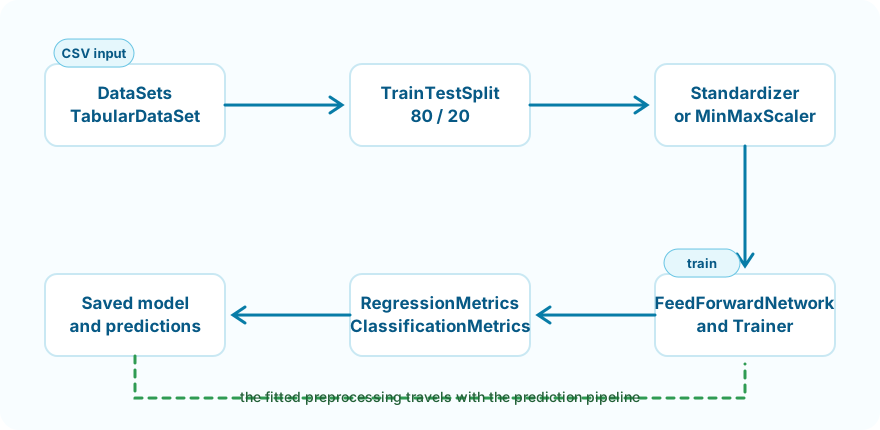
Each object represents one recognizable part of the model-development process.
Deep Netts 4 uses the JDK Vector API. Enable it when starting the Java process:
--add-modules=jdk.incubator.vector
This is a Java runtime argument, not a Deep Netts API call. Pass it through the application run configuration in any Java IDE or through the command that starts the application.
The examples explicitly disable CUDA:
DeepNetts.getInstance().setUseCuda(false);
This selects CPU execution. It is suitable for the small datasets and models used in the introductory examples and avoids requiring a local CUDA installation.
Unlike the Vector API argument, this setting belongs in Java source and must run
before data loading or model construction. Some examples also accept optional JVM
system properties, such as -Ddeepnetts.epochs=1, for a short smoke test without
changing the default training configuration.
Run from any Java environment
These are standard Maven projects. Use Getting Started for terminal and IDE setup, or Running Examples for the complete standalone-project workflow. Those pages contain the platform-specific commands, so they are not repeated in this lesson.
The current tabular examples load a CSV file using DataSets.readCsv:
TabularDataSet<MLDataItem> dataSet =
        DataSets.readCsv(
                DATASET_PATH,
                NUM_INPUTS,
                NUM_OUTPUTS,
                true,
                ","
        );
The arguments describe:
| Argument | Meaning |
|---|---|
DATASET_PATH |
Location of the CSV file |
NUM_INPUTS |
Number of feature columns |
NUM_OUTPUTS |
Number of target columns |
true |
The CSV contains a header |
"," |
Column delimiter |
TabularDataSet represents the loaded rows and retains information such as column names. MLDataItem represents the individual data items consumed by the model.
For the introductory examples, input columns come first and target columns come last.
Before training, it is useful to verify that the expected data was loaded:
System.out.println("Samples: " + dataSet.size());
System.out.println(
        "Columns: " + Arrays.toString(dataSet.getColumnNames())
);
This is a basic structural check, not a complete data-quality analysis. A real project may also need to examine missing values, invalid values, distributions, duplicates, and class balance.
The examples shuffle with a fixed seed:
dataSet.shuffle(42);
Using the same seed helps reproduce the same ordering in repeated runs.
The data is then split into training and test subsets:
TrainTestSplit split = dataSet.trainTestSplit(0.8);

DataSet<MLDataItem> trainingSet = split.getTrainingSet();
DataSet<MLDataItem> testSet = split.getTestSet();
The value 0.8 assigns 80% of the samples to training. The remaining 20% is reserved for evaluation.
The training set teaches the model. The test set measures performance on data that was not used to learn the model parameters.
Deep Netts provides preprocessing objects that can be fitted on training data and then applied consistently to other data.
The computer-hardware-performance-prediction example uses standardization:
Standardizer standardizer = new Standardizer(trainingSet);

standardizer.apply(trainingSet);
standardizer.apply(testSet);
The binary and multiclass classification examples use Min-Max scaling:
MinMaxScaler scaler = DataSets.scaleToMinMax(trainingSet);

scaler.apply(testSet);
In both cases, preprocessing parameters are learned from the training set only. Applying the same transformation to the test set preserves a fair evaluation and avoids data leakage.
FeedForwardNetwork.builder() provides a fluent API for defining layers and model behavior.
A sorting-execution-time-prediction model can be expressed as:
FeedForwardNetwork neuralNet =
        FeedForwardNetwork.builder()
                .addInputLayer(NUM_INPUTS)
                .addOutputLayer(NUM_OUTPUTS, ActivationType.LINEAR)
                .lossFunction(LossType.MEAN_SQUARED_ERROR)
                .randomSeed(42)
                .build();
This corresponds to the architecture:
6 -> 1
A binary classifier can include hidden layers:
FeedForwardNetwork neuralNet =
        FeedForwardNetwork.builder()
                .addInputLayer(NUM_INPUTS)
                .addFullyConnectedLayer(32)
                .addFullyConnectedLayer(16)
                .addOutputLayer(NUM_OUTPUTS, ActivationType.SIGMOID)
                .lossFunction(LossType.CROSS_ENTROPY)
                .randomSeed(42)
                .build();
This corresponds to:
5 -> 32 -> 16 -> 1
A multiclass classifier uses one output for every class:
FeedForwardNetwork neuralNet =
        FeedForwardNetwork.builder()
                .addInputLayer(4)
                .addFullyConnectedLayer(16, ActivationType.TANH)
                .addOutputLayer(3, ActivationType.SOFTMAX)
                .lossFunction(LossType.CROSS_ENTROPY)
                .randomSeed(42)
                .build();
This corresponds to 4 -> 16 -> 3. Softmax turns the three outputs into comparable class probabilities.
The builder keeps architecture decisions together: layer sizes, output activation, loss function, and random seed.
ImageSet stores labeled ExampleImage samples. Each image is resized to a fixed input shape and represented as scaled RGB channels:
ImageSet imageSet = new ImageSet(IMAGE_WIDTH, IMAGE_HEIGHT);

ExampleImage image = new ExampleImage(
        imagePath.toFile(), resizedImage, className);
image.setTargetOutput(new Tensor1D(target));
imageSet.add(image);
Build a ConvolutionalNetwork when local spatial patterns matter:
ConvolutionalNetwork neuralNet = ConvolutionalNetwork.builder()
        .addInputLayer(IMAGE_WIDTH, IMAGE_HEIGHT, 3)
        .addConvolutionalLayer(6, Filters.ofSize(3))
        .addMaxPoolingLayer(2, 2)
        .addFullyConnectedLayer(16)
        .addOutputLayer(1, ActivationType.SIGMOID)
        .lossFunction(LossType.CROSS_ENTROPY)
        .build();
The output activation and loss function should match the prediction task:
| Problem | Output activation | Loss function |
|---|---|---|
| Regression | LINEAR |
MEAN_SQUARED_ERROR |
| Binary classification | SIGMOID |
CROSS_ENTROPY |
| Multiclass classification | SOFTMAX |
CROSS_ENTROPY |
For regression, the model must produce an unrestricted numerical value. For binary classification, the Sigmoid output produces a value between 0 and 1. For multiclass classification, Softmax produces one probability per class.
The network exposes its trainer through getTrainer():
neuralNet.getTrainer()
        .setStopEpochs(50)
        .setLearningRate(0.001f)
        .setOptimizer(OptimizerType.SGD)
        .setShuffle(true);
These calls configure training rather than changing the network architecture.
| Setting | Purpose |
|---|---|
| Epochs | Maximum number of passes through the training data |
| Learning rate | Size of each parameter update |
| Optimizer | Algorithm used to update weights and biases |
| Shuffle | Changes sample order between training passes |
The spam example additionally enables mini-batch training with setBatchMode(true) and setBatchSize(64).
Training starts with one method call:
neuralNet.train(trainingSet);
Deep Netts performs forward propagation, loss calculation, backpropagation, and parameter updates internally.
After training, the same network can be tested on unseen data:
RegressionMetrics metrics =
        (RegressionMetrics) neuralNet.test(testSet);
or:
ClassificationMetrics metrics =
        (ClassificationMetrics) neuralNet.test(testSet);
The metric type depends on the task. Regression and classification answer different evaluation questions, so they require different measurements.
A model expects future inputs to be transformed in the same way as its training data. The preprocessing object is therefore attached before saving:
neuralNet.setNormalizer(standardizer);
neuralNet.save(MODEL_PATH);
For both classification examples, the attached object is the MinMaxScaler instead.
Keeping the transformation with the model reduces the risk of applying different preprocessing during prediction.
The trained network accepts a feature array in the same order used by the dataset:
float predictedValue = neuralNet.predict(input)[0];
For regression, the first output is the predicted numerical value. For binary classification, it is interpreted as the positive-class probability and can be compared with a threshold. For multiclass classification, predict returns one probability per class and the largest value determines the final label.
Feature order is part of the model contract. Changing the order changes the meaning of the input, even if the array still has the correct length.
The essential Deep Netts calls form a compact pipeline:
DataSets.readCsv(...)
dataSet.shuffle(...)
dataSet.trainTestSplit(...)
preprocessor.apply(...)
FeedForwardNetwork.builder()
neuralNet.getTrainer()
neuralNet.train(...)
neuralNet.test(...)
neuralNet.save(...)
neuralNet.predict(...)
The complete runnable projects show these calls in context. The next lesson explains why the overall model-development workflow must be treated as more than just model training.
ImageSet and a compact convolutional network.Place these API calls into a complete, reproducible, and trustworthy workflow.
A typical workflow combines datasets, preprocessing, a neural-network builder, a trainer, evaluation metrics, and prediction methods.
Their combination defines the learning objective and must represent the prediction task correctly, such as Softmax with multiclass cross-entropy.
Was this helpful?
Thank you!